ClassTogether
Teacher sign-in

Student? Enter the join code

Your teacher shows it on the board or on their screen.

Your name and answers are shared only with this lesson's teacher; in a quiz your name and score are shown to the class too. Privacy notice for students

The interactive presentation tool that puts your slides, your quiz and your class's pulse on one screen

ClassTogether is a live classroom platform for teachers. The presentation you are teaching opens on every student's phone and laptop; a live quiz, a quick yes/no poll and an end-of-lesson survey show you what the class understood before the lesson is over.

Students need no account and no app. One join code for the whole course.
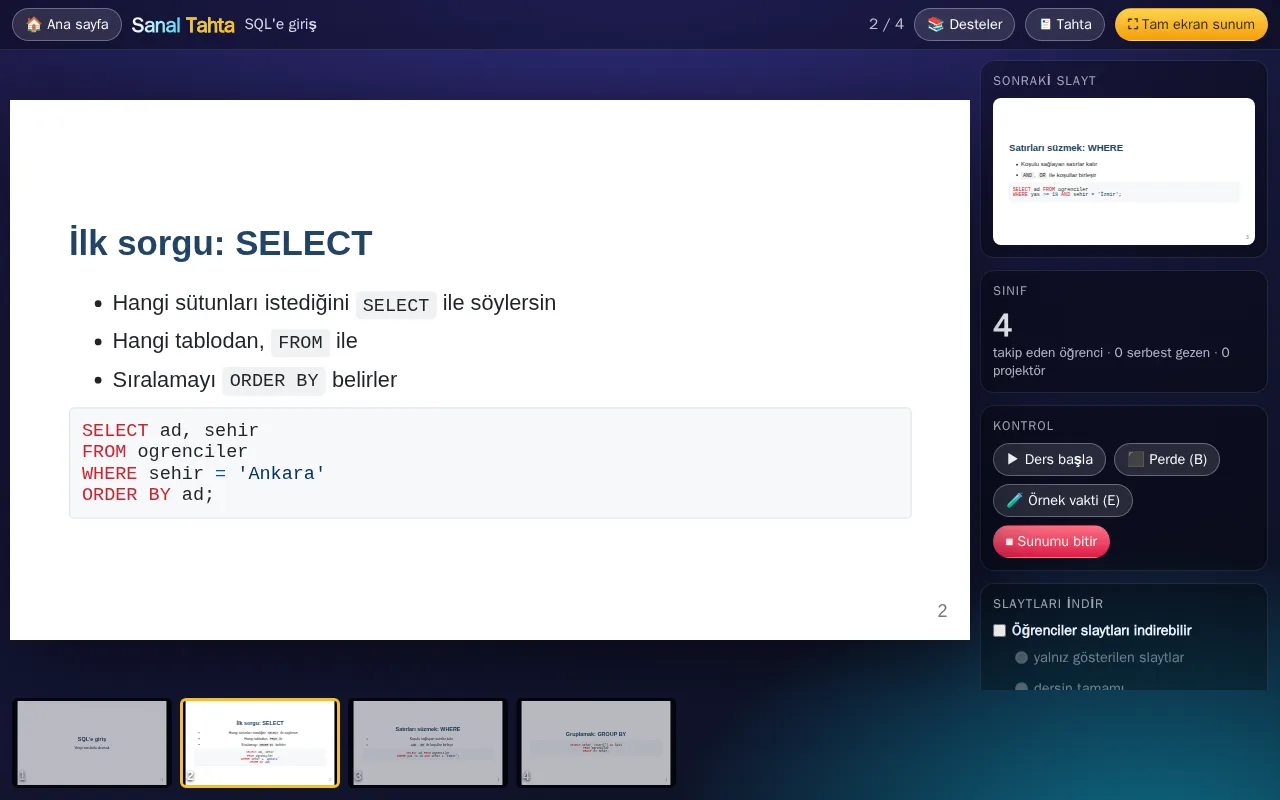
The teacher's control screen of the interactive presentation tool: the current slide, the next slide, the slide strip and the classroom tools

How it works

  1. Upload your slides

    Create a free account. Add your PDF or Marp (Markdown) presentations, your quizzes and the files you want to hand out to your lessons. A whole course folder can come straight from a git repository.

  2. Students join with a code

    Students type the 6-character code from the board or scan the QR code, enter a name and they are in. No sign-up, no password, no app store.

  3. Teach, live

    When you move to the next slide, every student's screen moves with you. Start the quiz, the poll or the survey whenever the lesson calls for it.

Interactive presentation tools for teachers, one join code

These interactive teaching tools all run behind the same join code, on one classroom engagement platform. The student stays on one page, and that page changes with the flow of the lesson: slide, question, poll, survey.

Interactive slides while you teach

  • Slides follow the teacherStudents see the slide you have open on their own screen. They can look back at earlier slides but cannot skip ahead of you.
  • Pointer and highlightsYour pointer and the text you highlight appear on every student's slide and on the projector, at the same spot.
  • Exercise slides with hintsMark a slide as an exercise and add hints and a solution. Students take hints one at a time, or you release them when the class is ready.
  • Ask the AI about this slideWith your permission, a student can ask a question about the open slide and get an answer in private, without interrupting you.
  • A virtual teacher figureAn optional animated figure stands in the corner of the slide, follows your pointer and reacts on your cue. Handy on the projector and in online lessons.

Live quiz

  • Timed live quizQuestions open on the board and on every student's screen at the same moment. Correct and fast earns more points.
  • Fair timingResponse time is measured from the moment the question reached that student's screen. A slow Wi-Fi does not cost points.
  • Course leaderboardPoints add up across every quiz of the course. On the last day you announce the champion on the board.

Classroom polling and engagement tools

  • Yes/no quick pollAsk out loud, the answer buttons appear on every screen, the count builds up on your panel. Close it and everyone sees the result. With the quiz and the survey it works as a student response system, no clickers needed.
  • Classroom timerCount down for a break or an exercise. The same clock runs on the board, on your screen and on every student's.
  • Energy meterStudents mark how they feel during the lesson, anonymously. You see the class average and the trend.
  • Exit surveyCollect anonymous end-of-course feedback with a ready template or your own questions. Download the results as CSV.

What the teacher and the student see

The teacher's control screen of the live classroom platform: the current slide, the next slide, the slide strip and the classroom tools
The teacher's control screen: the open slide, the next one and the classroom tools side by side.
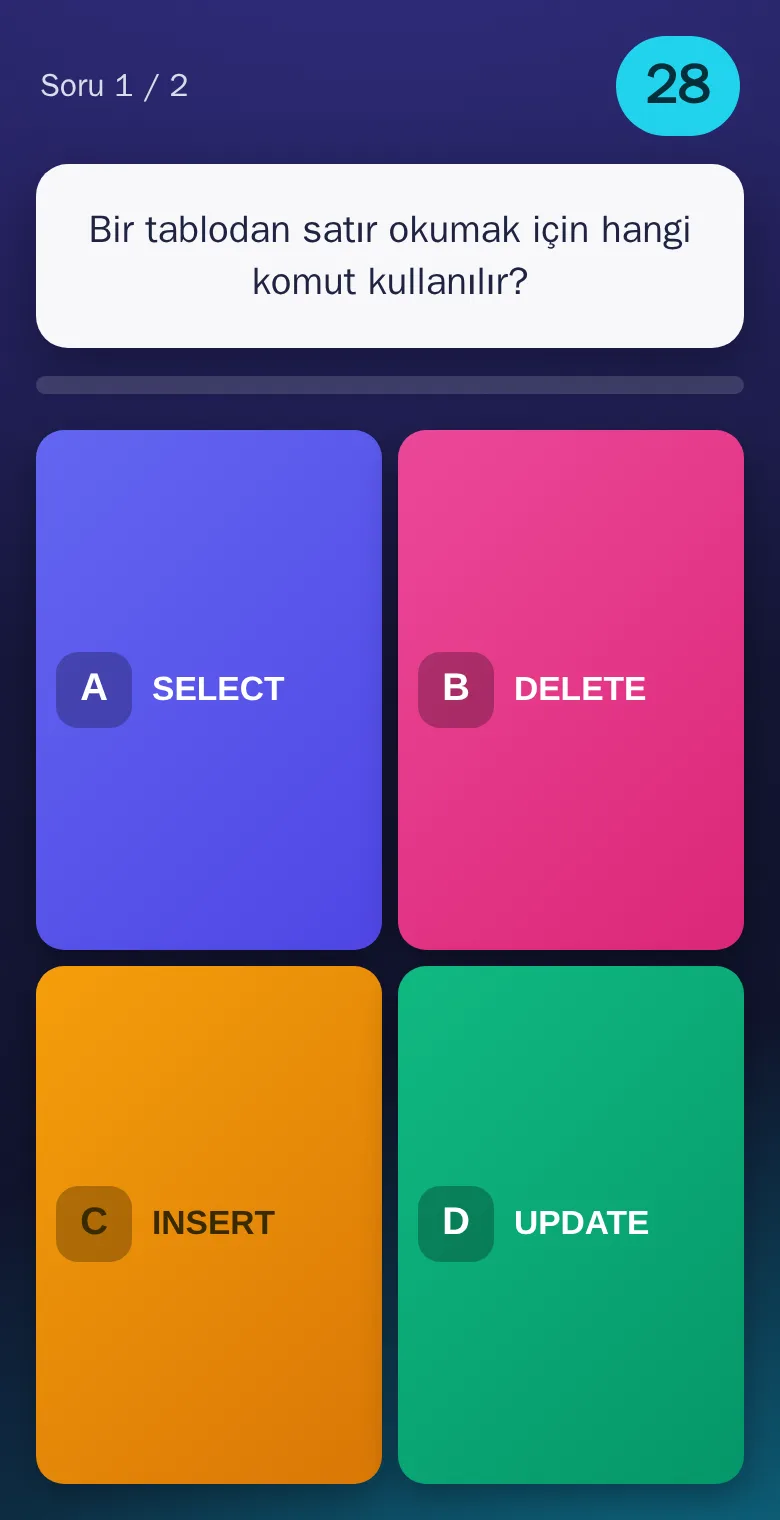
A live quiz question on a student's phone: the question text, the time left and the coloured answer buttons
A live quiz question on a student's phone.

Frequently asked questions

Is ClassTogether free?

Yes. It is free to use for now, with no participant, question or session limits.

Is it an interactive presentation tool or a quiz app?

Both, on the same page. The slides you are teaching open on every student's screen; the live quiz, the yes/no poll and the survey open inside that lesson and the slide comes back when they end. You do not switch tools in the middle of a class.

Can it replace our clickers?

Yes. Students answer quiz questions, yes/no polls and the exit survey from their own phones or laptops, so ClassTogether works as a student response system with no hardware to buy or hand out.

Do students need an account?

No. Students type the join code and a name, and they are in. We do not ask for an e-mail address, a password or a phone number.

Which devices does it work on?

Any device with a current browser: phones, tablets, laptops and the classroom computer connected to the projector. There is nothing to install, and the projector needs no cable.

How many students can join?

We have not set a limit. A class of 30 or a lecture hall of 300 can join the same room. If you are weighing the options, see how it compares with Kahoot, Mentimeter and Wooclap.

Do I need a new code for every quiz?

No. Students join once with the join code; the slides, the quiz, the polls and the survey all open on the same page. The code stays the same for the whole course.

What happens to my data?

Data is stored on Amazon Web Services. Student answers are deleted automatically after a set period, and a teacher can delete their account and all its data at any time. The details are in the privacy policy.

Teach your next lesson with ClassTogether.